Model Benchmarking
!!! warning "Under Construction" This documentation is currently under active development and subject to change. Some sections may be incomplete or missing.
Model Benchmarking
- need to include Tony's documentation here.
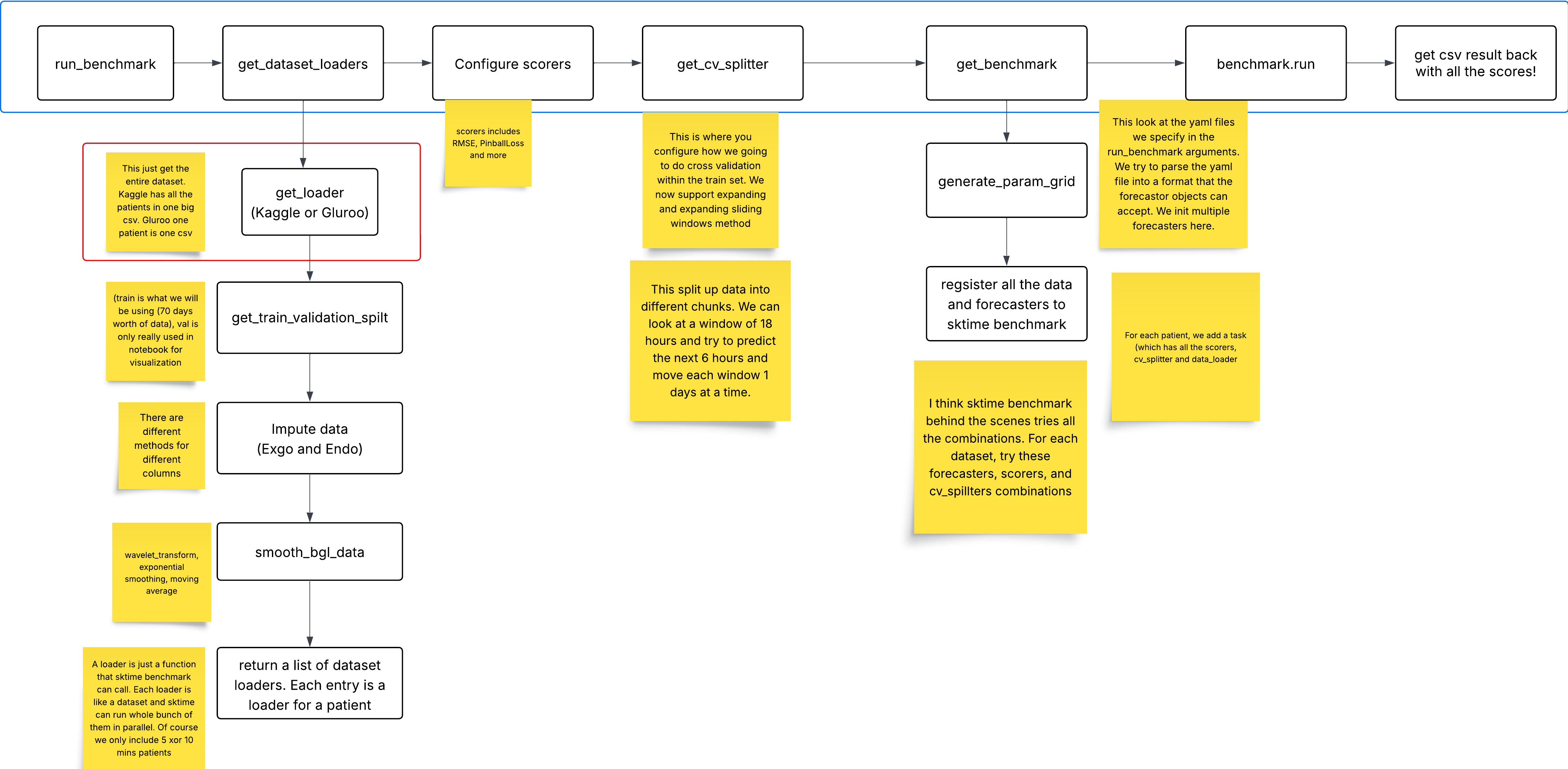
Hyperparameter YAML Configuration Guide
This README explains how to define hyperparameter options for each forecasting model in YAML format to be used for tuning.
General Structure of a YAML Entry
Each model should be added as a top-level key in the YAML file, with parameters specified as nested keys:
ModelName:
  parameter_name:
    type: <one of supported parameter types>
    # other parameters will depend on `type`, see below
IMPORTANT: The
typeparameter does NOT correspond to the data type, it corresponds to the specific parameter types described below. Please read through each of these carefully.
Supported Parameter Types & Best Practices
List (Categorical Parameters)
- Generates your
valueslist as is in the parameter grid. - Use when the parameter takes a predefined set of values.
- Best for options like trend types, seasonal components, or model selection.
Example:
AutoARIMA:
  seasonal_order:
    type: list
    values: [[0, 1, 1, 7], [1, 1, 1, 12]]
Integer (Discrete Ranges)
- Generates a range of integers specified by the start, end, and step values you provide in the
rangevalue. - Use when the parameter is a whole number within a logical range.
- Best for order selection (e.g., AR, MA terms in ARIMA), tree depths, or iteration counts.
Example:
AutoARIMA:
  max_order:
    type: int
    range: [1, 5]
Float (Continuous Ranges)
- Generates a range of decimals specified by the start, end, and step values you provide in the
rangevalue. - Use when the parameter can take decimal values within a range.
- Best for learning rates, smoothing factors, or penalty terms.
Example:
ExpSmoothing:
  smoothing_level:
    type: float
    range: [0.1, 1.0, 0.1]  # Start, End, Step
Boolean (True/False Options)
- Generates
[True, False]in the param grid. Does not require any additional keys likevaluesorrange. - Use for settings that toggle features on or off.
- Best for enabling/disabling trend components, intercepts, or constraints.
If you want to set a fixed bool value (e.g. setting the
suppress_warningsparameter to alwaysTrue), do not use this type, as it will generate[True, False]in the parameter grid regardless of thevaluesparameter you set. Instead usetype: listandvalues: [True](or whichever bool you want to use).
Example:
AutoARIMA:
  with_intercept:
    type: bool
Estimators
- Generates an instance of an estimator. The
estimatorskey should contain a list of the estimator types you want to use, and theestimator_kwargskey should contain a list of dictionaries, where each dictionary holds the arguments to pass into the corresponding estimator. - Specify whether it's a regressor (
sklearn) or a forecaster (sktime) in thetypevalue - The position of each dictionary in
estimator_kwargsshould match the position of the estimator it is meant for in theestimatorslist. For no arguments, pass an empty dictionary. - The
estimatorsentries should be the name of the estimators as listed in the sktime estimator registry. - Use for estimators that take other estimators as parameters (e.g. DirectTabularRegressionForecaster).
Forecaster Example:
DirectTabularRegressionForecaster:
  estimator:
    type: forecaster
    estimators: ["ARIMA"]
    estimator_kwargs: [
        {
            order: [1, 0, 0],
            suppress_warnings: True,
        }
    ]
Regressor Example:
VARReduce:
  regressor:
    type: regressor
    estimators: ["LinearRegression"]
    estimator_kwargs: [{}]